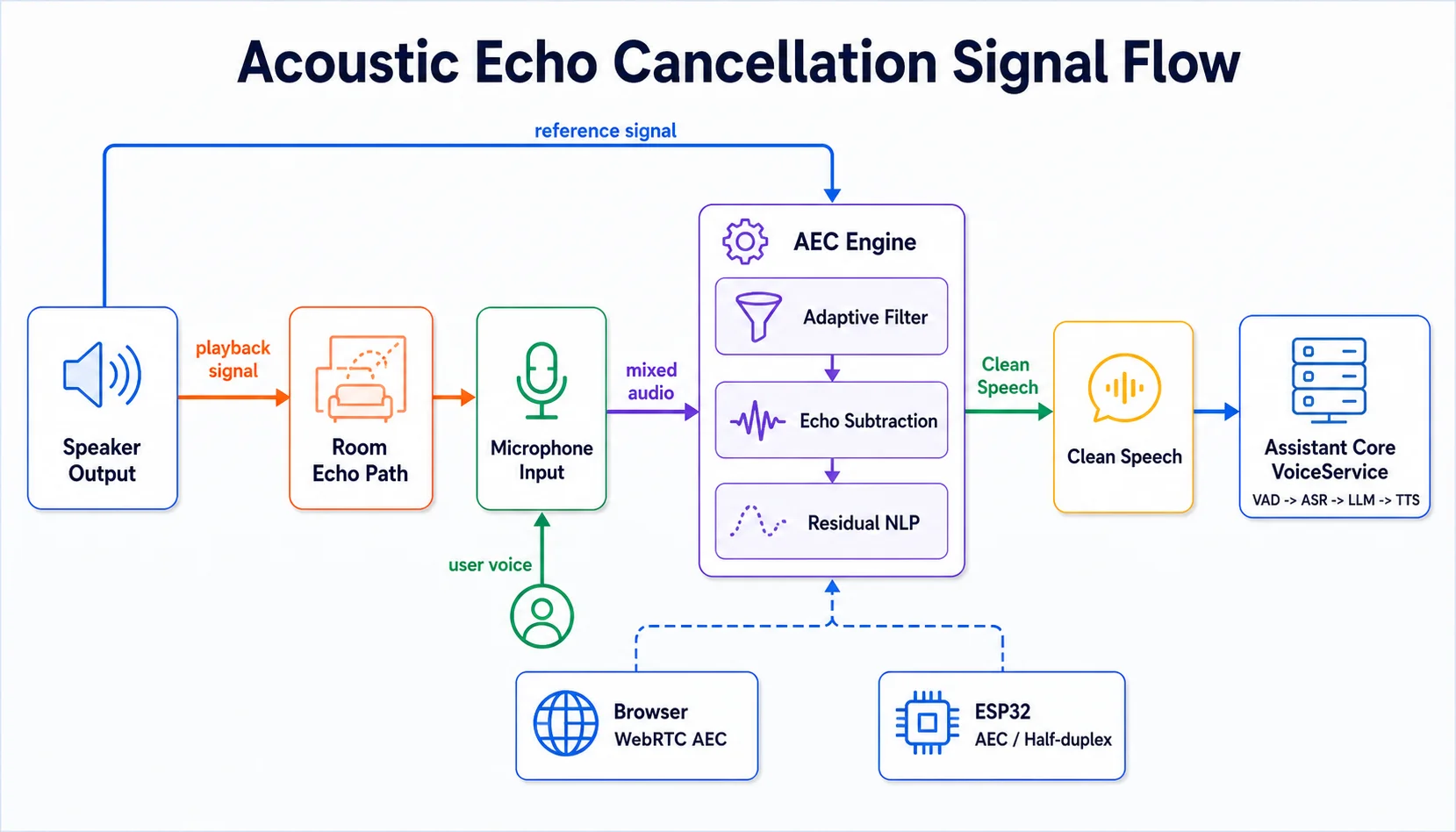
When building a voice assistant, you hit a problem right away: the microphone picks up the assistant's own voice playing through the speaker, creating an infinite echo loop. This is the Acoustic Echo Cancellation (AEC) problem — a field of digital signal processing that has existed for over 50 years but remains critically important in the age of AI voice.
This article explains how AEC works, how browsers and hardware devices handle it, and the lessons learned from integrating AEC into Assistant Core on both web and ESP32.
The Problem: The Echo Loop
Picture this: you ask the assistant a question. The assistant plays the answer through the speaker. The open microphone picks up the assistant's voice. The server receives this audio, thinks the user is speaking, processes it, and plays another response... The result is an assistant talking to itself.
With realtime models (OpenAI Realtime, Gemini Live, xAI Grok), the problem is even more severe because the microphone is always open in full-duplex mode. Unlike auto mode — where the mic is muted while TTS is playing — realtime mode streams audio continuously in both directions.
How Does AEC Work?
AEC is based on a simple idea: if you know which sound is playing through the speaker, you can subtract it from the microphone signal. The process has 3 steps:
- Reference signal — Take the audio being sent to the speaker as the reference signal
- Adaptive filter — Model how sound travels from speaker → room → microphone (the echo path)
- Subtraction — Subtract the estimated echo from the microphone signal, keeping only the user's voice
# Simplified AEC pipeline
def aec_process(mic_signal, reference_signal, filter_state):
    # 1. Adaptive filter predicts the echo
    estimated_echo = adaptive_filter(reference_signal, filter_state)

    # 2. Subtract the echo from the mic
    clean_signal = mic_signal - estimated_echo

    # 3. Update the filter (NLMS algorithm)
    error = mic_signal - estimated_echo
    filter_state = update_nlms(filter_state, reference_signal, error)

    return clean_signal, filter_state
The NLMS (Normalized Least Mean Squares) algorithm is the most commonly used. Compared to the original LMS, NLMS normalizes the step size by the signal energy — which helps it converge faster and stay more stable when the volume changes constantly (a characteristic of speech).
In addition, after subtracting the linear echo, there is still residual echo caused by nonlinear distortion (cheap speakers, clipping). A Non-Linear Processing (NLP) step detects and suppresses the remaining echo.
AEC in the Browser — Free and Good Enough
Good news: on the web, you don't need to implement AEC yourself. Browsers (Chrome, Firefox, Safari) already integrate AEC through the Web Audio API:
// Enable AEC when capturing the microphone
const stream = await navigator.mediaDevices.getUserMedia({
  audio: {
    echoCancellation: true,    // AEC
    noiseSuppression: true,    // Noise reduction
    autoGainControl: true,     // Normalize volume
  }
})

// Chrome uses AEC3 — an adaptive filter in the frequency domain
// Reference signal = audio being played through the speaker
// All processing happens at the kernel level, no extra code needed
Chrome specifically uses AEC3 — a module that processes in the frequency domain (FFT) rather than the time domain, allowing it to model complex rooms more efficiently. The process:
- Capture the reference signal from the audio output device
- An adaptive filter (PBFDAF) estimates the room impulse response
- Subtract the echo and apply a Non-Linear Processor to the residual
You can debug AEC in Chrome at chrome://webrtc-internals — view the real-time AEC state and download raw audio dumps for analysis.
AEC on ESP32 — Much More Complex
The ESP32 has no browser and no built-in AEC. You have to handle it yourself, and there are 3 approaches:
| Solution | RAM | Quality | Device |
|---|---|---|---|
| ESP-ADF aec_stream | ~50KB | Good | ESP32-S3 + dual mic |
| Codec hardware AEC | ~0KB | Very good | Boards with ES8311/ES7210 |
| Mute mic while playing | ~0KB | Basic | Any board (half-duplex) |
ESP-ADF (Espressif Audio Development Framework) provides algorithm_stream with built-in AEC. The key point is that the reference signal must exactly match the audio being played through the speaker — if it is delayed, compressed, or distorted, the adaptive filter will not converge.
// ESP-ADF: configure AEC for the ESP32-S3
algorithm_stream_cfg_t algo_cfg = {
    .input_type = ALGORITHM_STREAM_INPUT_TYPE2,
    .algo_mask = ALGORITHM_STREAM_USE_AEC
               | ALGORITHM_STREAM_USE_NS    // Noise suppression
               | ALGORITHM_STREAM_USE_AGC,  // Auto gain
    .sample_rate = 16000,
    .mic_ch = 1,
    .ref_ch = 1,        // Reference = speaker output
    .debug_input = true, // Enable to calibrate delay
};

// Delay calibration: recording should lag 0-10ms behind the reference
algo_stream_set_delay(algo_stream, 5);  // 5ms
The ESP32-S3-BOX and Korvo-2 boards have built-in hardware AEC via a codec chip — this works best. A custom-designed board with an INMP441 + MAX98357A needs to use software AEC or accept muting the mic during playback (half-duplex).
Realtime AI Providers — No One Supports Server-Side AEC
An important truth: none of the three major realtime providers handle AEC on the server.
| Provider | Server AEC | Server VAD | Notes |
|---|---|---|---|
| OpenAI Realtime | ❌ | ✅ | Has a WebRTC endpoint (AEC in the browser) |
| Gemini Live | ❌ | ✅ | Very sensitive VAD — prone to interrupt loops |
| xAI Grok | ❌ | ✅ | Full-duplex, relies on client AEC |
The consequence: if echo slips past the client AEC, the server VAD will mistake the echo for the user's voice — leading to an interrupt loop (the model repeatedly interrupts itself, especially with Gemini Live because its VAD is very sensitive).
Real-World Lessons from Assistant Core
- Web client: 0 lines of AEC code —
echoCancellation: trueingetUserMediais enough. Laptops and desktops all have good AEC at the hardware + browser level. - ESP32: choose the board carefully — A board with a codec chip that has a reference channel (ES8311) gives the best AEC. A simple board (INMP441 + MAX98357A) will have to make a trade-off: software AEC costs RAM, or half-duplex costs UX.
- Headphones = perfect AEC — When using headphones, the echo is eliminated physically. This is the best recommendation for users experiencing echo problems, especially on mobile.
- Gemini needs special attention — Its VAD sensitivity is higher than OpenAI/xAI. If you hit an interrupt loop, increasing
prefixPaddingMsin the session config gives extra buffer time before the VAD triggers.
When Do You Need to Worry About AEC?
A simple rule of thumb:
- Web app on laptop/desktop → No worries, the browser handles it
- Web app on mobile (external speaker) → AEC is weaker, recommend headphones
- ESP32 with the speaker near the microphone → Needs hardware AEC or software AEC
- Bluetooth headset → May have high latency, and AEC sometimes doesn't compensate correctly
AEC is a solved problem on most modern platforms. The developer's job is to understand how it works so they can choose the right solution for each type of client — not to implement it from scratch.