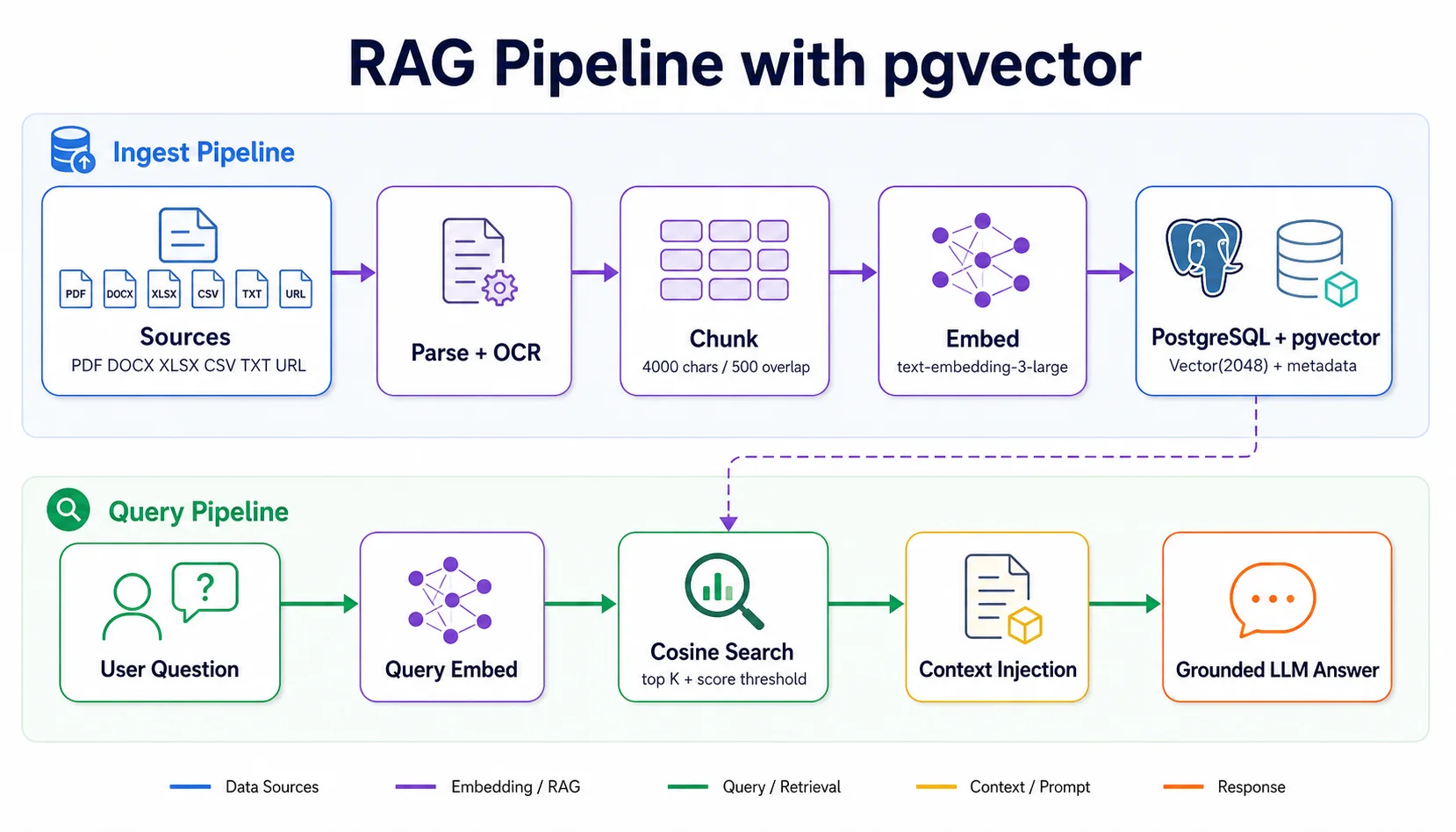
When a business wants an AI assistant to answer accurately from internal documents — contracts, procedures, product policies — the answer is RAG (Retrieval-Augmented Generation). This article explains how we built the RAG pipeline in Assistant Core, from ingest to production query.
The Problem with a Plain LLM
LLMs are trained on public data — they don't know your products, your internal processes, or the latest order status. When asked directly about data that isn't in their training set, an LLM will "hallucinate" — producing answers that look plausible but are completely wrong.
Fine-tuning is one option, but it's expensive, slow to update, and a poor fit for frequently changing data. RAG solves the problem differently: retrieve first, answer second.
RAG's Two-Stage Architecture
RAG splits into two independent pipelines:
- Ingest Pipeline — runs offline whenever a new document arrives: Document → Parse → Chunk → Embed → Store in pgvector
- Query Pipeline — runs in real time on every request: Question → Embed → Cosine Search → Top-K chunks → Inject into prompt → LLM answers
Ingest Pipeline — Implementation Details
We support 7 input formats: PDF, DOCX, XLSX, CSV, TXT, web URLs (via Firecrawl), and plain text. Each type has its own parser to extract clean text before chunking.
# Chunking strategy in Assistant Core
CHUNK_SIZE = 4000       # characters
CHUNK_OVERLAP = 500     # overlap so context isn't lost

# Embedding
EMBEDDING_MODEL = "text-embedding-3-large"
EMBEDDING_DIMENSIONS = 2048  # reduced from 3072

async def ingest_document(file_path: str, kb_id: str):
    # 1. Parse
    text = await parse_document(file_path)

    # 2. Chunk with overlap
    chunks = chunk_text(text, CHUNK_SIZE, CHUNK_OVERLAP)

    # 3. Embed batch (128 chunks/request)
    embeddings = await embed_batch(chunks)

    # 4. Store in pgvector
    await store_chunks(chunks, embeddings, kb_id)
Batch embedding is important for keeping API costs down. At 128 chunks per request, a 200-page document needs only ~20 API calls instead of ~500.
pgvector — Vector Search Right Inside PostgreSQL
Instead of using Pinecone or Weaviate, we chose pgvector — a PostgreSQL extension for vector search. The big advantage: no separate service to manage, ACID transactions are still guaranteed, and metadata filtering uses plain SQL.
-- Schema for document chunks
CREATE TABLE document_chunks (
    id          UUID PRIMARY KEY DEFAULT gen_random_uuid(),
    kb_id       UUID NOT NULL REFERENCES knowledge_bases(id),
    content     TEXT NOT NULL,
    embedding   VECTOR(2048),
    metadata    JSONB DEFAULT '{}'
);

-- IVFFlat index for query speed
CREATE INDEX ON document_chunks
USING ivfflat (embedding vector_cosine_ops)
WITH (lists = 100);

-- Query: semantic search with metadata filter
SELECT content, 1 - (embedding <=> $query_vec) AS score
FROM document_chunks
WHERE kb_id = $kb_id
  AND (metadata->>'doc_type') = 'policy'  -- filter
ORDER BY embedding <=> $query_vec
LIMIT 5;
Query Pipeline — Real-Time Flow
When a user sends a question, the pipeline runs three steps in about ~150ms:
- Embed query — using the same model as ingest (
text-embedding-3-large) - Cosine search — find the 5–8 nearest chunks in pgvector
- Inject context — insert the chunks into the system prompt so the LLM answers with grounding
# Query pipeline
async def query_knowledge_base(question: str, kb_id: str) -> str:
    # Embed question
    q_embedding = await embed_text(question)

    # Semantic search
    chunks = await pgvector_search(
        embedding=q_embedding,
        kb_id=kb_id,
        top_k=5,
        min_score=0.75
    )

    # Build grounded prompt
    context = "\\n---\\n".join([c.content for c in chunks])
    system_prompt = f"""Answer based on the following context:

{context}

If the information is not in the context, say so clearly."""

    return await llm.chat(system_prompt, question)
Production Tips from Real Experience
- Chunk size of 3000–4000 characters works best for enterprise documents. Too small loses context; too large introduces noise.
- Overlap of 400–600 characters ensures no information is lost at chunk boundaries.
- A minimum score threshold of 0.70–0.75 filters out irrelevant chunks.
- Cache embeddings of common questions in Redis (TTL 1 hour) to cut latency by ~40%.
- Metadata tagging at ingest time lets you filter by document type, department, or update date.
Measured Results
With this pipeline, the assistant answers accurately from the internal knowledge base, cites specific sources, and almost never hallucinates. In a test of 500 questions about product policy, accuracy reached 91% compared to 34% with a plain LLM and no RAG.