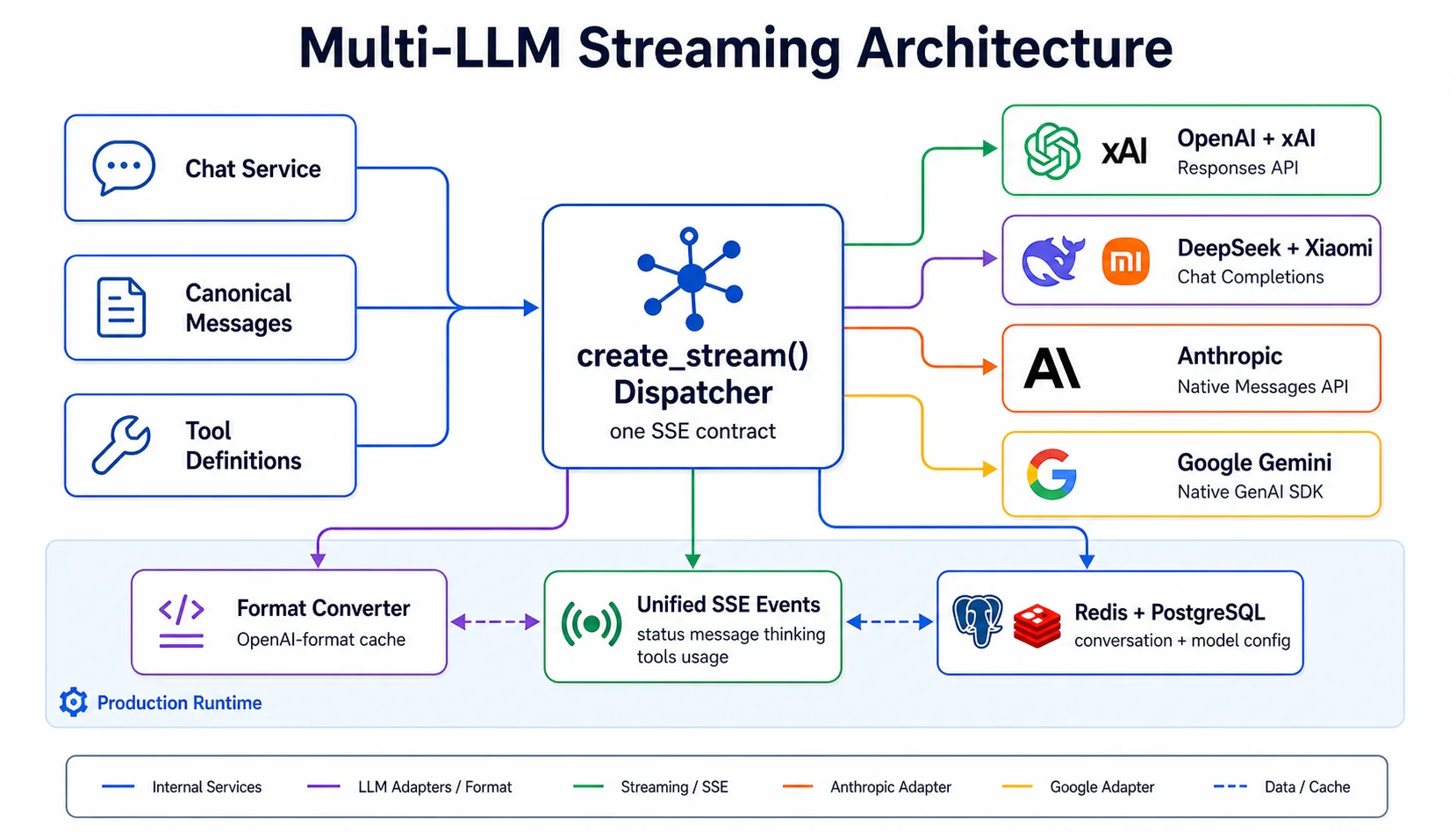
When you build a serious AI product, the question is not "which model" but "how do we change models without rewriting the product". The model catalog changes every quarter; the architecture underneath does not, and that is the part worth writing about. This post describes how the Assistant Core runtime serves six providers with three SDKs, stores conversation history in one canonical format, maps three thinking levels to each provider's parameters, and what we measured about prompt caching.
Why multi-LLM
- Each task has a fitting model. High-volume customer support needs cheap and fast; multi-step tool work needs a stronger model; audio and video input is accepted by only a few models.
- Prices and lifecycles. Providers change prices and retire models every quarter. An integration tied to a model name gets rewritten every time; one tied to a provider only needs a configuration change.
- Single-vendor risk. When one provider has an outage, an assistant owner switches the model in the Admin Panel and carries on.
One thing to be clear about: OpenAI, Anthropic, Google and xAI are our suppliers, not our competitors. Customers never bring their own API keys; every model call is billed in credits from the credit table, where each model has an input, cached-input and output price. An example turn (3,000 tokens in, 800 out) costs about 1 credit on MiMo V2.6 Flash, GPT-6 Luna or Haiku 5.5 and about 42 credits on Opus 5.5, so matching the model to the job is the biggest cost decision after caching.
The model catalog
| Provider | Chat models | Notes |
|---|---|---|
| OpenAI | GPT-6.1 Sol, GPT-6 Luna | 1.05M-token context |
| Anthropic | Opus 5.5, Sonnet 5.5, Haiku 5.5 | Thinking always on, effort is adjustable |
| Gemini 3.8 Flash, Gemini 3.5 Flash Lite | Also accept audio and video | |
| xAI | Grok 4.7, Grok 4.3 | |
| DeepSeek | DeepSeek Flash | Platform default |
| Xiaomi | MiMo V2.6 Flash, MiMo V2.6 Pro | Cheapest output and cached input |
Every model accepts text and images. The catalog lives in the database, so the platform team can add, disable or reprice a model without a deploy, and the model picker always shows what is available. See AI models for which model wins when the user, the owner and the platform all have a setting.
Native SDKs, no abstraction layer
We do not use LangChain or any shared abstraction layer. The reason: an abstraction layer always lags the provider. Prompt caching, thinking modes, the Responses API's configuration_update, Gemini's thought signatures: each arrived at one provider first, and a middle layer needs weeks to catch up. When something breaks, debugging through three layers is far slower than reading the request that was sent.
Three clients serve six providers:
AsyncOpenAIcalls the Responses API for OpenAI, xAI, DeepSeek and Xiaomi MiMo.AsyncAnthropiccalls the Messages API.google-genaifor Gemini.
"OpenAI-compatible" is a spectrum, not a standard. Each provider implements a subset of the Responses API, and sending an unsupported field is at best ignored and at worst a 400. So each provider has a profile that declares what gets sent:
@dataclass(frozen=True)
class ResponsesProfile:
    base_url: str | None
    send_store: bool = False               # store=false: history stays client-side
    include_encrypted_reasoning: bool = False
    reasoning_summary: bool = False
    prompt_cache_key: CacheKeyScope | None = None
    pinned_reasoning_effort: str | None = None
    forced_tool_choice: bool = True
    parallel_tool_calls: bool = False

def create_stream(client, config, messages, tools, ...):
    if config.provider == ProviderCode.GOOGLE:
        return stream_gemini_native(...)
    if config.provider == ProviderCode.ANTHROPIC:
        return stream_anthropic_native(...)
    return stream_responses_api(..., RESPONSES_PROFILES[config.provider])
One dispatcher, three generators, and every generator emits the same event stream (status, text, thinking, tool calls, usage) to the rest of the system.
A canonical conversation history
To switch models mid-conversation, the history must belong to no provider. Our canonical format is Responses-style items: message, function_call, function_call_output, reasoning and configuration_update. Responses-compatible providers receive it almost verbatim; adapters translate it for Anthropic and Gemini.
The hard part is reasoning state. Each provider returns it opaque: OpenAI encrypts it, Gemini attaches a thought signature to function calls. A reasoning item is tagged with the provider and model that produced it and is replayed only to that exact model; every other adapter drops it. The result is that a user can be chatting with DeepSeek Flash, switch to Sonnet 5.5, and Sonnet sees every earlier message and tool call, minus the other model's thoughts. History stays client-side (store=false), which also suits zero-data-retention requirements.
Each turn's context comes from Redis (12 hours) and is rebuilt from Postgres on a miss. Tool outputs older than two turns are replaced by a one-line placeholder, and once a turn uses 64,000 tokens or more, a background job summarizes the oldest messages so the conversation stays inside the model's context.
Three thinking levels, six ways to ask
Users see three levels: Instant, Standard and Extended. Each provider receives a different value:
| Provider | Off | Instant | Standard | Extended |
|---|---|---|---|---|
| OpenAI, xAI | none | low | medium | high |
| Anthropic (Claude 5.5) | always on, floor low | low | medium | high |
| Google (Gemini 3) | floor minimal | low | medium | high |
| DeepSeek | none | off | high | max |
| Xiaomi MiMo | none | off | on | on |
Claude 5.5 uses adaptive thinking with output_config.effort; Gemini 3 cannot fully disable thinking; MiMo is binary. The lesson: give the product one concept and map it down to each provider's native parameter, instead of surfacing provider parameters in the UI.
Prompt caching: measure, do not trust the docs
Caching is the optimization with the largest effect on operating cost. In the credit table, a cached input token on GPT-6 Luna or Haiku 5.5 costs one tenth of a regular one. Every provider has its own mechanism, and some things you only learn by measuring.
- Anthropic caches explicitly through
cache_control. We use 3 of the 4 breakpoints: the system prompt, the last tool, and an automatic request-level breakpoint that slides forward as the conversation grows. The TTL is 1 hour instead of the default 5 minutes, because chat users typically reply 5 to 60 minutes apart. The cache order is tools, system, then messages; thinking blocks are replayed unmodified, so every tool-loop iteration still hits the cached prefix. When we measured it, changing the effort level between turns did not invalidate the cache on Claude 5.5, although the documentation said it would. See Anthropic's prompt caching docs. - OpenAI caches automatically from 1,024 tokens. We send a per-user
prompt_cache_key, so a new conversation reuses the tools-and-system prefix while users stay isolated. On GPT-6,reasoning.effortis part of the cached prefix, so it is pinned to one value and a turn's effort is sent as aconfiguration_updateitem. One-off calls (titles, suggestions) opt out of cache writes to skip the write surcharge. See OpenAI's docs. - xAI uses the conversation id as the cache key for sticky routing. On grok-4.3, changing the effort level dropped the cache to 128 tokens, system prompt included, and
configuration_updateis rejected, so there is no workaround. xAI cache hits are noisy; run several trials before concluding anything. - Gemini caches prefixes implicitly: putting the system instruction and the tools first in every request is enough. See Gemini context caching.
- DeepSeek and MiMo cache automatically with no configuration.
The rules we keep: always enable caching, always read the usage fields to see how many tokens actually hit the cache, and measure again whenever a provider ships a new model.
Tool calling across six providers
Tool definitions use one function format, shared with the voice providers as well. The differences are in the details:
| Provider | Parallel calls | Force one tool |
|---|---|---|
| OpenAI, xAI | Enabled | Yes |
| DeepSeek | Automatic | Yes |
| Xiaomi MiMo | Automatic | No, auto only |
| Anthropic | Yes | Not while thinking is on, left at auto |
| Yes | Yes, through tool_config |
Before a request is sent, media parts the model cannot accept (a video sent to an image-only model, say) are replaced by a text note, so switching models never produces a request error. How tools, MCP servers and local connectors are wired into an assistant is covered in MCP for AI assistants.
Models by configuration, not by deploy
Models are data: the AIModel table holds the model code, provider, accepted input types and whether it is active. Owners pick a model per assistant in the Admin Panel, users pick one for their own conversations in the web app, and the API accepts model per request; the first setting with a value wins in that order, ending with the platform default. No restart. What configuration cannot do is add a provider: that still takes code, an enum and a profile or adapter. We say "switch models through configuration", not "plug in any provider".
A model-selection heuristic
- Start with the default, DeepSeek Flash, with caching on.
- High-volume support: Haiku 5.5, GPT-6 Luna or MiMo V2.6 Flash, where cached input is cheapest.
- Multi-step tool work or long documents: Sonnet 5.5, Opus 5.5 or GPT-6.1 Sol.
- Audio or video input: Gemini 3.8 Flash.
- Measure the cost per turn in the credit table before changing the default for every user.
How users pick a model in the web app is in Choose a model. The document retrieval layer does not depend on the model; see RAG on pgvector.